class: middle, center, inverse background-image: url("assets/pexels-engin-akyurt-1435895.jpg") background-size: cover # Creating panel assignments ## Recipes for CATI surveys --- class: section-title-0, inverse, middle, center # About assignments --- layout: true class: title, title-0 --- # Defined by outputs - Video of assignment on tablet --- # Defined by inputs - Set of tab-delimited files - Zipped --- # Defined by choices - Which variables to preload --- layout: false class: section-title-1, inverse, middle, center # First round --- layout: true class: title, title-1 --- # Final product .pull-left[ TODO: Video of a created assignment interview on tablet - Assignment on dashboard - Preloaded phone numbers - Preloaded members ] .pull-right[ ### Identifying information - Region - Household ID ### Personal information - Phone number(s) - Valid number(s) - Whose number - Members - Names - Other details (e.g., age, gender, relationship) ] --- # Intermediary products - Household data - List of members - Roster of members - List of phone numbers - Roster of phone numbers --- # Raw ingredients - Household data - Location - Phone number(s) - Member data - Name - Other details (e.g., age, gender, relationship) --- # Household data <img src="assets/household_data.png" width="100%" style="display: block; margin: auto;" /> --- # Member data <img src="assets/member_data.png" width="100%" style="display: block; margin: auto;" /> --- # Recipe 👨🍳 1. Set up project parameters 1. Determine which households have **valid** phone numbers 1. Draw sample of households 1. Create interview ID 1. Create roster of numbers 1. Create list of numbers 1. Create roster of people 1. Create list of people 1. Create household-level data 1. Add lists--of numbers and of people--to the household-level data 1. Create list of variables to protect--the lists 1. Decide which interviewers get which cases 1. Decide which interviewsto record 1. Check your work 1. Save to tab-delimited files 1. Zip all tab files --- # Tools 🔪 - `use` - `generate` / `replace` - `egen rownonmiss` - `rename` - `keep` - `regexm` - `tempfile` - `merge` - `save` - `reshape wide` - `reshape long` - `outsheet` / `export delimited` - `zipfile` ??? R tools: - haven / readr - dplyr - stringr - tidyr - fs - zip --- # Set up project parameters <svg style="height:0.8em;top:.04em;position:relative;fill:white;" viewBox="0 0 512 512"><path d="M487.4 315.7l-42.6-24.6c4.3-23.2 4.3-47 0-70.2l42.6-24.6c4.9-2.8 7.1-8.6 5.5-14-11.1-35.6-30-67.8-54.7-94.6-3.8-4.1-10-5.1-14.8-2.3L380.8 110c-17.9-15.4-38.5-27.3-60.8-35.1V25.8c0-5.6-3.9-10.5-9.4-11.7-36.7-8.2-74.3-7.8-109.2 0-5.5 1.2-9.4 6.1-9.4 11.7V75c-22.2 7.9-42.8 19.8-60.8 35.1L88.7 85.5c-4.9-2.8-11-1.9-14.8 2.3-24.7 26.7-43.6 58.9-54.7 94.6-1.7 5.4.6 11.2 5.5 14L67.3 221c-4.3 23.2-4.3 47 0 70.2l-42.6 24.6c-4.9 2.8-7.1 8.6-5.5 14 11.1 35.6 30 67.8 54.7 94.6 3.8 4.1 10 5.1 14.8 2.3l42.6-24.6c17.9 15.4 38.5 27.3 60.8 35.1v49.2c0 5.6 3.9 10.5 9.4 11.7 36.7 8.2 74.3 7.8 109.2 0 5.5-1.2 9.4-6.1 9.4-11.7v-49.2c22.2-7.9 42.8-19.8 60.8-35.1l42.6 24.6c4.9 2.8 11 1.9 14.8-2.3 24.7-26.7 43.6-58.9 54.7-94.6 1.5-5.5-.7-11.3-5.6-14.1zM256 336c-44.1 0-80-35.9-80-80s35.9-80 80-80 80 35.9 80 80-35.9 80-80 80z"/></svg> .panelset[ .panel[.panel-name[Folders] ```stata * FOLDERS local proj_dir "" // folder where all project files are located local input_dir "`proj_dir'" // folder where input files are found. For example: "`proj_dir'/input/" local output_dir "`proj_dir'" // folder where output files are found. For example: "`proj_dir'/output/" ``` ] .panel[.panel-name[Input files] ```stata * FILES * input: local hhold_file_in "households.dta" // household file for this demo local member_file_in "members.dta" // members file for this demo ``` ] .panel[.panel-name[Output files] ```stata * output: local hhold_file_out "cati_panel_round1.tab" * file name = questionnaire variable * to find this name: * - open the questionnaire in Designer * - click on SETTINGS * - copy value from Questionnaire variable local number_file_out "numbers.tab" * NUMBERS ROSTER * file name = roster ID in Designer local member_file_out "members.tab" * MEMBERS ROSTER * file name = (first) roster ID in Designer ``` ] .panel[.panel-name[Household] .pull-left[ ```stata local hhold_file_out "cati_panel_round1.tab" * file name = questionnaire variable * to find this name: * - open the questionnaire in Designer * - click on SETTINGS * - copy value from Questionnaire variable ``` ] .pull-right[ 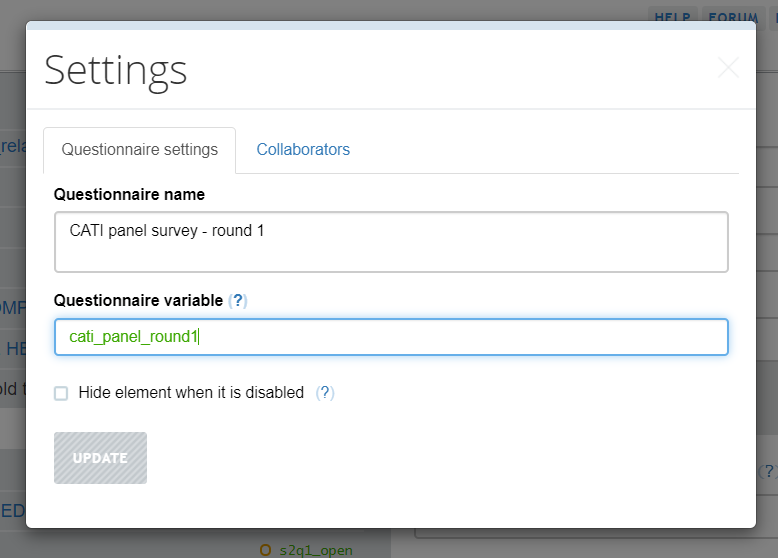 ] ] .panel[.panel-name[Numbers] .pull-left[ ```stata local number_file_out "numbers.tab" * NUMBERS ROSTER * file name = roster ID in Designer ``` ] .pull-right[ 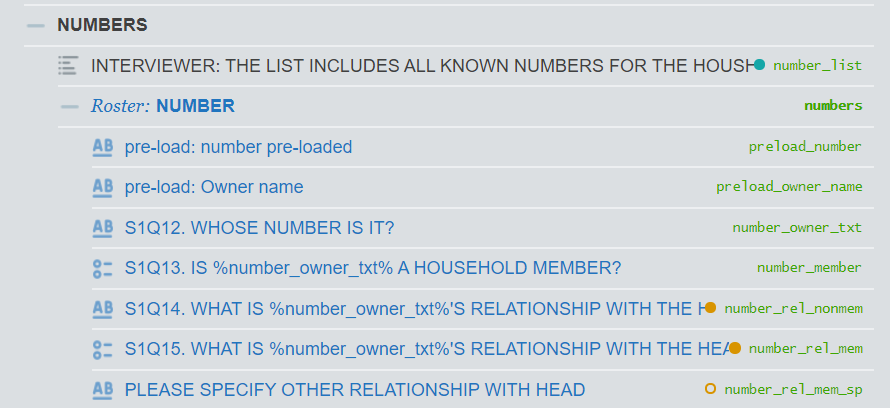 ] ] .panel[.panel-name[Members] .pull-left[ ```stata local member_file_out "members.tab" * MEMBERS ROSTER * file name = (first) roster ID in Designer ``` ] .pull-right[ 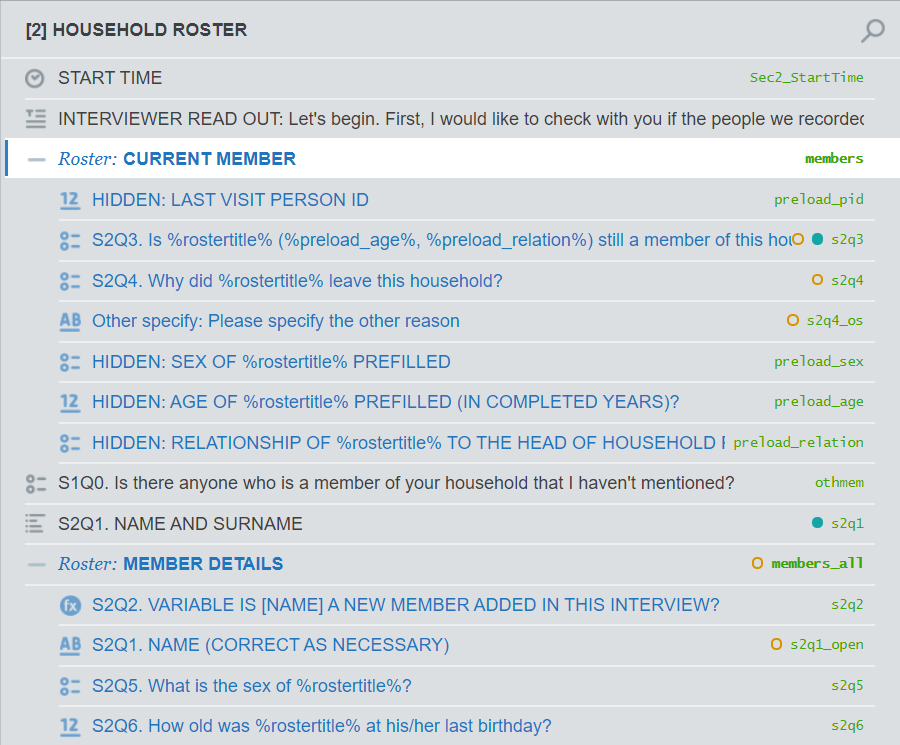 ] ] ] --- # See which households have **valid** contacts - Look for missings—explicit and implicit - Check that numbers follow known patterns --- # Look for missings—explicit and implicit ```stata use "`input_dir'/`hhold_file_in'", clear * compile all types of implicit and explicit missings * this may require inspection of data and iterative work * use regular expressions (aka regex) to specify patterns * see more on Stata's use of regex here: https://www.stata.com/support/faqs/data-management/regular-expressions/ * see more about regex on cheat sheets lik this one: https://cheatography.com/davechild/cheat-sheets/regular-expressions/ * note, however, that Stata only allows a subset of regex. see FAQ linked above for more details // same number for all digits local numbers = "99[ ]*99[ ]*99[ ]99|88[ ]*88[ ]*88[ ]*88" // "none" written in place of number local none = "[Aa][Uu][Cc][Uu][Nn]" // SuSo's missing value marker for strings local missing = "##N/A##" * combine all missing values into a reglar expression local implicit_missings = "`numbers'|`none'|`missing'" local number_vars = "s00q12 s00q14 s00q16 s00q18" foreach number_var of local number_vars { replace `number_var' = "" if regexm(`number_var', "`implicit_missings'") } ``` --- # Check that numbers follow known patterns ```stata * use regular expressions to remove invalid numbers * see more on Stata's use of regular expressions here: https://www.stata.com/support/faqs/data-management/regular-expressions/ * step 1: compile valid phone number patterns for all telephone providers * source: International Telecommunications Union (ITU): https://www.itu.int/oth/T0202000083/en local sotelma_cdma_bamako = "^20[ ]*79" local sotelma_cdma_regions = "^21 7" local sotelma_fix = "^20[ ]*2|^20[ ]*7[0-8]|^21[ ]*2[67]|^21[ ]*[45689]" local atel_fix = "^40[0-4]" local orange_fix_bamako = "^44[ ]*[239]" local orange_fix_regions = "^44[ ]*1" local atel_mobile = "^50" local sotelma_mobile = "^6|^9[5-9]|^89" local orange_mobile = "^7|^9[0-4]|^8[23]" * step 2: combine all patterns into a single regular expression local valid_number = "`sotelma_cdma_bamako'|`sotelma_cdma_regions'|`sotelma_fix'|`atel_fix'|`orange_fix_bamako'|`orange_fix_regions'|`atel_mobile'|`sotelma_mobile'|`orange_mobile'" * step 3: remove numbers that do not fit these patterns local number_vars = "s00q12 s00q14 s00q16 s00q18" foreach number_var of local number_vars { replace `number_var' = "" if !regexm(`number_var', "`valid_number'") } ``` --- # Keep households with at least 1 valid contact ```stata * count the number of valid numbers of the 4 possible numbers provided egen num_valid = rownonmiss(s00q12 s00q14 s00q16 s00q18), strok * keep observations with 1 or more valid contacts (i.e., non-missing numbers) keep if (num_valid > 0) ``` --- # Draw sample of households .left-column-bg[ ```stata * apply some selection rule(s) to sample households * keep if mod(_n, 2) == 0 // for example, keep every second observation * keep selected households tempfile households save "`households'", replace * keep members associated with selected households use "`input_dir'/`member_file_in'", clear merge m:1 hhid using "`households'", /// keep(3) /// keep cases present in both files--that is, members for selected households keepusing(hhid) /// keep no variables nogen noreport /// do not create _merge variable and do not report merge result * keep members for selected households tempfile members save "`members'", replace ``` ] .right-column-sm[ - Out of the scope of this training - Contact your local sampler for guidance ] --- # Create new interview ID <svg style="height:0.8em;top:.04em;position:relative;fill:white;" viewBox="0 0 576 512"><path d="M528 32H48C21.5 32 0 53.5 0 80v16h576V80c0-26.5-21.5-48-48-48zM0 432c0 26.5 21.5 48 48 48h480c26.5 0 48-21.5 48-48V128H0v304zm352-232c0-4.4 3.6-8 8-8h144c4.4 0 8 3.6 8 8v16c0 4.4-3.6 8-8 8H360c-4.4 0-8-3.6-8-8v-16zm0 64c0-4.4 3.6-8 8-8h144c4.4 0 8 3.6 8 8v16c0 4.4-3.6 8-8 8H360c-4.4 0-8-3.6-8-8v-16zm0 64c0-4.4 3.6-8 8-8h144c4.4 0 8 3.6 8 8v16c0 4.4-3.6 8-8 8H360c-4.4 0-8-3.6-8-8v-16zM176 192c35.3 0 64 28.7 64 64s-28.7 64-64 64-64-28.7-64-64 28.7-64 64-64zM67.1 396.2C75.5 370.5 99.6 352 128 352h8.2c12.3 5.1 25.7 8 39.8 8s27.6-2.9 39.8-8h8.2c28.4 0 52.5 18.5 60.9 44.2 3.2 9.9-5.2 19.8-15.6 19.8H82.7c-10.4 0-18.8-10-15.6-19.8z"/></svg> ```stata * SuSo assignments require a unique ID named interview__id * A simple way to do this is to create a * sequential number for each observation use "`households'", clear gen interview__id = _n tempfile households save "`households'", replace * Add this new ID to each file use "`members'", clear merge m:1 hhid using "`households'", /// merge by hhid keepusing(interview__id) /// add interview__id from households file keep(3) nogen noreport /// do not create _merge; do not report; keep matching cases only tempfile members save "`members'", replace ``` --- # Create roster of numbers <svg style="height:0.8em;top:.04em;position:relative;fill:white;" viewBox="0 0 320 512"><path d="M272 0H48C21.5 0 0 21.5 0 48v416c0 26.5 21.5 48 48 48h224c26.5 0 48-21.5 48-48V48c0-26.5-21.5-48-48-48zM160 480c-17.7 0-32-14.3-32-32s14.3-32 32-32 32 14.3 32 32-14.3 32-32 32zm112-108c0 6.6-5.4 12-12 12H60c-6.6 0-12-5.4-12-12V60c0-6.6 5.4-12 12-12h200c6.6 0 12 5.4 12 12v312z"/></svg> .panelset[ .panel[.panel-name[Reshape] .pull-left[ ```stata use "`households'", clear * keep necessary variables only keep interview__id s00q10 - s00q18 * rename variables so that: * - names and numbers have expressive stub names * - contain indices to facilitate reshaping rename (s00q10 s00q13 s00q15 s00q17) /// (name1 name2 name3 name4) rename (s00q12 s00q14 s00q16 s00q18) /// (number1 number2 number3 number4) * reshape so names and numbers, respectively, * inhabit their own columns reshape long name@ number@, i(interview__id) j(number_id) * retain rows with non-empty contacts only keep if (!mi(name) & !mi(number)) ``` ] .pull-right[ 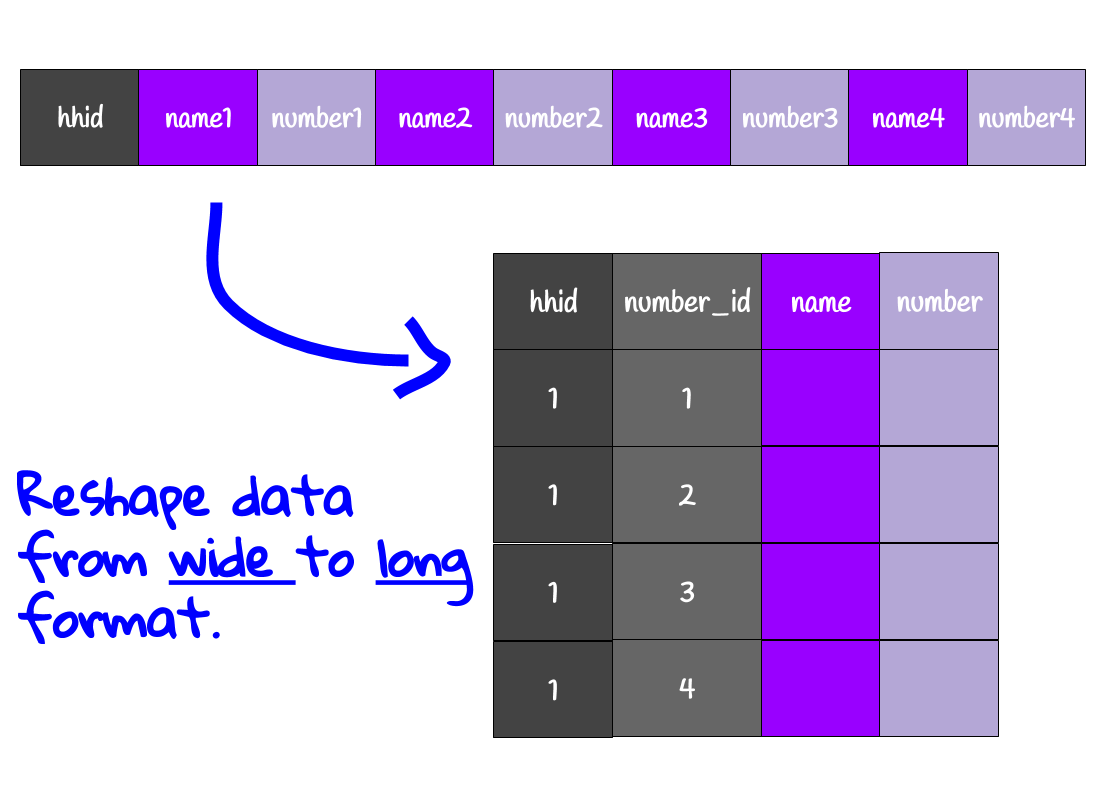 ] ] .panel[.panel-name[Rename] .pull-left[ ```stata * create variables for preloading * map variables to expected columns gen number_list = number gen preload_number = number gen preload_owner_name = name gen number_owner_txt = name * determine who owns number based on source variable * contacts 1 and 2 are for members * contacts 3 and 4 are for non-members gen number_member = . replace number_member = 1 if inlist(number_id, 1, 2) replace number_member = 2 if inlist(number_id, 3, 4) * determine relationship to head by source variable * contact 1 is for the household head gen number_rel_mem = . replace number_rel_mem = 1 if (number_id == 1) ``` ] .pull-left[ <img src="assets/number_roster.png" width="95%" style="display: block; margin: auto 0 auto auto;" /> ] ] .panel[.panel-name[Retain] .pull-left[ ```stata * create ID variables * household * interview__id, already in dset, is used by SuSo * contact number sort interview__id number_id bysort interview__id: gen numbers__id = _n * retain only the necessary variables keep interview__id numbers__id /// number_list /// preload_number /// preload_owner_name /// number_owner_txt /// number_member /// number_rel_mem tempfile numbers_roster save "`numbers_roster'" ``` ] .pull-left[ <img src="assets/number_roster.png" width="95%" style="display: block; margin: auto 0 auto auto;" /> ] ] ] --- # Create list of numbers <svg style="height:0.8em;top:.04em;position:relative;fill:white;" viewBox="0 0 320 512"><path d="M272 0H48C21.5 0 0 21.5 0 48v416c0 26.5 21.5 48 48 48h224c26.5 0 48-21.5 48-48V48c0-26.5-21.5-48-48-48zM160 480c-17.7 0-32-14.3-32-32s14.3-32 32-32 32 14.3 32 32-14.3 32-32 32zm112-108c0 6.6-5.4 12-12 12H60c-6.6 0-12-5.4-12-12V60c0-6.6 5.4-12 12-12h200c6.6 0 12 5.4 12 12v312z"/></svg> .pull-left[ ```stata use "`numbers_roster'" keep interview__id numbers__id number_list * decrement each index by 1 * list questions are 0-indexed in SuSo replace numbers__id = numbers__id - 1 * rename to match list question naming * list questions are composed of: * - core variable name: var * - index of list element: # * - separator: __ * that is, elements of the form: var__# rename number_list number_list__ * reshape from long roster to wide list * see image at right for intuition reshape wide number_list__, i(interview__id) j(numbers__id) tempfile numbers_list save "`numbers_list'" ``` ] .pull-right[ 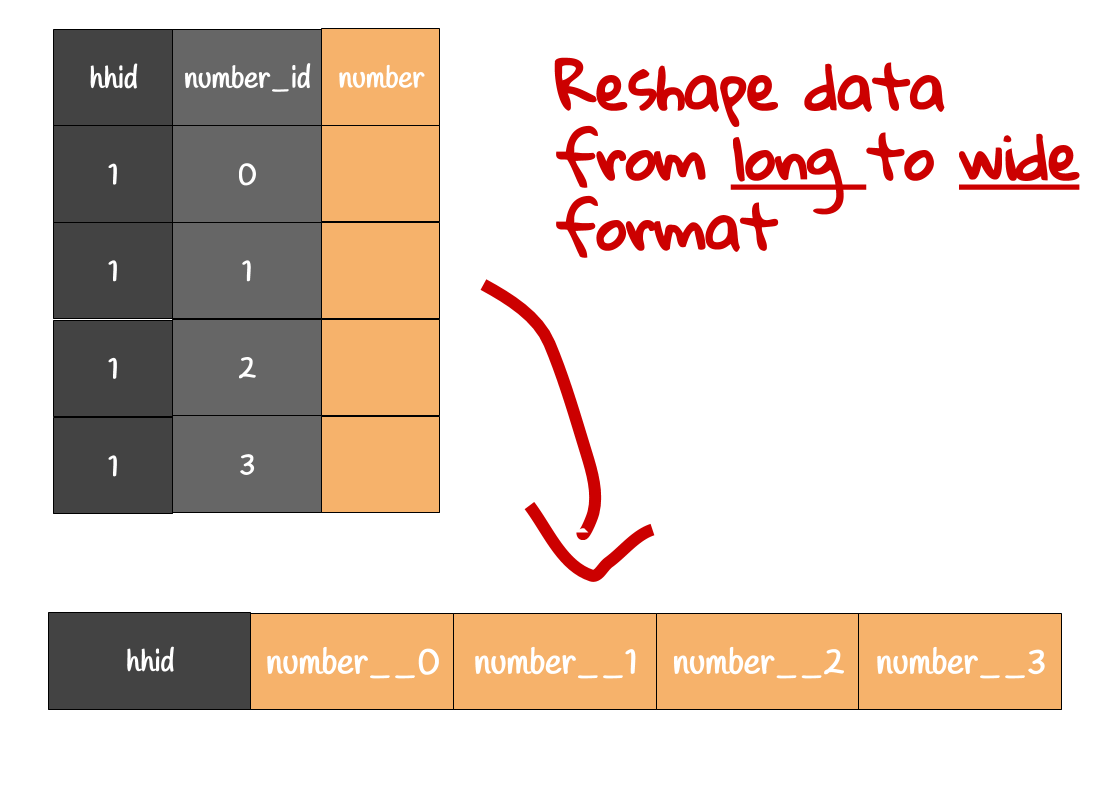 ] --- # Create roster of people <svg style="height:0.8em;top:.04em;position:relative;fill:white;" viewBox="0 0 640 512"><path d="M96 224c35.3 0 64-28.7 64-64s-28.7-64-64-64-64 28.7-64 64 28.7 64 64 64zm448 0c35.3 0 64-28.7 64-64s-28.7-64-64-64-64 28.7-64 64 28.7 64 64 64zm32 32h-64c-17.6 0-33.5 7.1-45.1 18.6 40.3 22.1 68.9 62 75.1 109.4h66c17.7 0 32-14.3 32-32v-32c0-35.3-28.7-64-64-64zm-256 0c61.9 0 112-50.1 112-112S381.9 32 320 32 208 82.1 208 144s50.1 112 112 112zm76.8 32h-8.3c-20.8 10-43.9 16-68.5 16s-47.6-6-68.5-16h-8.3C179.6 288 128 339.6 128 403.2V432c0 26.5 21.5 48 48 48h288c26.5 0 48-21.5 48-48v-28.8c0-63.6-51.6-115.2-115.2-115.2zm-223.7-13.4C161.5 263.1 145.6 256 128 256H64c-35.3 0-64 28.7-64 64v32c0 17.7 14.3 32 32 32h65.9c6.3-47.4 34.9-87.3 75.2-109.4z"/></svg> .panelset[ .panel[.panel-name[Remove] ```stata use "`members'", clear * Keep only those members that are still part of the household (according to the last survey) * This is most relevant for panel surveys * This may also be applicable for multi-visit cross-sectional surveys * Keep this code only if applicable. keep if still_member == 1 ``` ] .panel[.panel-name[Rename] .pull-left[ <img src="assets/members_roster.png" width="100%" style="display: block; margin: auto;" /> ] .pull-right[ ```stata * rename/create variables to match SuSo // panel person ID gen preload_pid = s00q00a // name rename s00q00b s2q1 gen s2q1_open = s2q1 // sex rename s01q01 s2q5 gen preload_sex = s2q5 // age rename s01q03 s2q6 gen preload_age = s2q6 // relationship rename s01q02 s2q7 gen preload_relation = s2q7 ``` ] ] .panel[.panel-name[Renumber] ```stata * sort by household and person IDs * not stricly needed; just neater sort interview__id s00q00a * create a new sequential person identifier * why? * SuSo needs a person ID that: * - starts with 0 * - is sequential * - has no gaps in sequence * This ensures that member list (next slide) is of correct form * Person ID may not be sequential for a few reasons: * - Members may have been dropped (earlier this slide) * - Gaps exist because of data generation process bysort interview__id: generate members__id = _n ``` ] .panel[.panel-name[Keep] .pull-left[ <img src="assets/members_roster.png" width="100%" style="display: block; margin: auto;" /> ] .pull-right[ ```stata keep interview__id members__id /// IDs preload_pid /// panel ID preload_sex /// sex preload_age /// age preload_relation /// relationship s2q1 s2q1_open /// name s2q5 /// sex s2q6 /// age s2q7 /// relationship tempfile members_roster save "`members_roster'" ``` ] ] ] ??? TODO: Consider 3-column design for rename panel: - data - Designer - code - Remove any that have left - Rename variables - Recode variables (WHY???) - Create sequential ID that starts from 1 - Preserve panel ID - Keep variables --- # Create list of people <svg style="height:0.8em;top:.04em;position:relative;fill:white;" viewBox="0 0 640 512"><path d="M96 224c35.3 0 64-28.7 64-64s-28.7-64-64-64-64 28.7-64 64 28.7 64 64 64zm448 0c35.3 0 64-28.7 64-64s-28.7-64-64-64-64 28.7-64 64 28.7 64 64 64zm32 32h-64c-17.6 0-33.5 7.1-45.1 18.6 40.3 22.1 68.9 62 75.1 109.4h66c17.7 0 32-14.3 32-32v-32c0-35.3-28.7-64-64-64zm-256 0c61.9 0 112-50.1 112-112S381.9 32 320 32 208 82.1 208 144s50.1 112 112 112zm76.8 32h-8.3c-20.8 10-43.9 16-68.5 16s-47.6-6-68.5-16h-8.3C179.6 288 128 339.6 128 403.2V432c0 26.5 21.5 48 48 48h288c26.5 0 48-21.5 48-48v-28.8c0-63.6-51.6-115.2-115.2-115.2zm-223.7-13.4C161.5 263.1 145.6 256 128 256H64c-35.3 0-64 28.7-64 64v32c0 17.7 14.3 32 32 32h65.9c6.3-47.4 34.9-87.3 75.2-109.4z"/></svg> ```stata use "`members_roster'", clear keep interview__id members__id s2q1 * SuSo's list is 0-indexed * members__id starts with 1 * subtract 1 from each member__id so the two match replace members__id = members__id - 1 * SuSo's list question are formatted as follows: * - each element of the list occupies its own column * - each list element's name consists: of the list question's variable * name, __ as a separator, and list element's index * (e.g. var__0 for the 1st element, var__2 for the 2nd, etc) * To put the data in SuSo's format: * rename the variable to be of the form var__ rename s2q1 s2q1__ * reshape the data so that each element is a column and each * column has name of the form var__0, var__1, etc. reshape wide s2q1__, i(interview__id) j(members__id) tempfile members_list save "`members_list'" ``` ??? TODO: Consider adding a stylized image of the operation May need to revise comment width so that not cut off --- # Create household-level data <svg style="height:0.8em;top:.04em;position:relative;fill:white;" viewBox="0 0 576 512"><path d="M280.37 148.26L96 300.11V464a16 16 0 0 0 16 16l112.06-.29a16 16 0 0 0 15.92-16V368a16 16 0 0 1 16-16h64a16 16 0 0 1 16 16v95.64a16 16 0 0 0 16 16.05L464 480a16 16 0 0 0 16-16V300L295.67 148.26a12.19 12.19 0 0 0-15.3 0zM571.6 251.47L488 182.56V44.05a12 12 0 0 0-12-12h-56a12 12 0 0 0-12 12v72.61L318.47 43a48 48 0 0 0-61 0L4.34 251.47a12 12 0 0 0-1.6 16.9l25.5 31A12 12 0 0 0 45.15 301l235.22-193.74a12.19 12.19 0 0 1 15.3 0L530.9 301a12 12 0 0 0 16.9-1.6l25.5-31a12 12 0 0 0-1.7-16.93z"/></svg> .pull-left[ 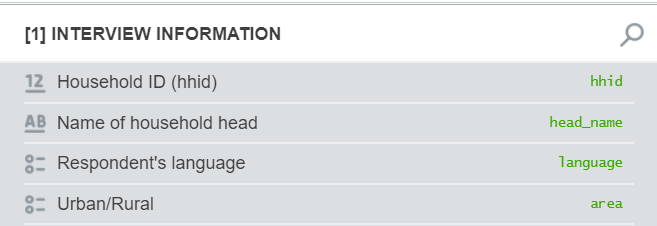 ] .pull-right[ ```stata use household.dta, clear * rename variables to match SuSo rename s00q10 head_name rename urban_rural area rename s00q28 language * keep only those needed by SuSo * since SuSo does not know how to * handle extra variables keep interview__id hhid head_name area language tempfile households save "`households'", replace ``` ] --- # Add lists to the household-level data <svg style="height:0.8em;top:.04em;position:relative;fill:white;" viewBox="0 0 576 512"><path d="M280.37 148.26L96 300.11V464a16 16 0 0 0 16 16l112.06-.29a16 16 0 0 0 15.92-16V368a16 16 0 0 1 16-16h64a16 16 0 0 1 16 16v95.64a16 16 0 0 0 16 16.05L464 480a16 16 0 0 0 16-16V300L295.67 148.26a12.19 12.19 0 0 0-15.3 0zM571.6 251.47L488 182.56V44.05a12 12 0 0 0-12-12h-56a12 12 0 0 0-12 12v72.61L318.47 43a48 48 0 0 0-61 0L4.34 251.47a12 12 0 0 0-1.6 16.9l25.5 31A12 12 0 0 0 45.15 301l235.22-193.74a12.19 12.19 0 0 1 15.3 0L530.9 301a12 12 0 0 0 16.9-1.6l25.5-31a12 12 0 0 0-1.7-16.93z"/></svg> .pull-left[ 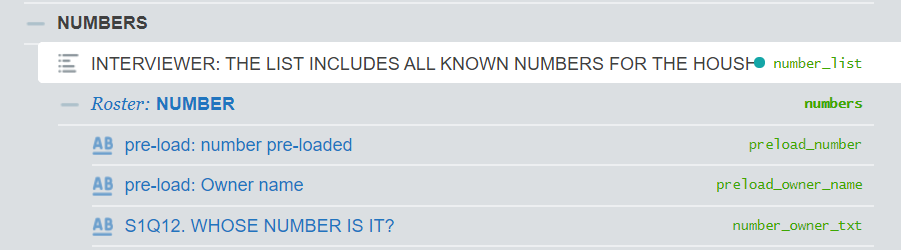 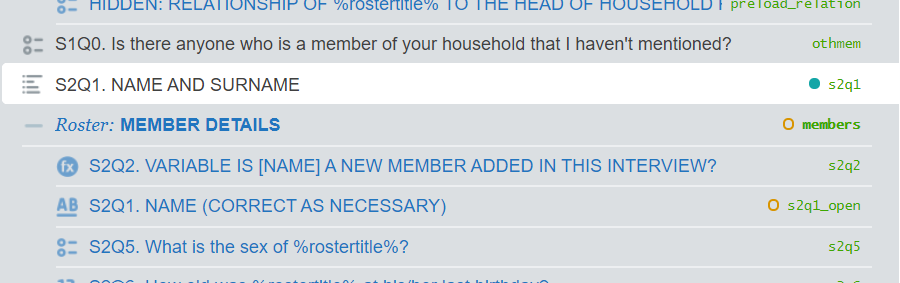 ] .pull-right[ ```stata use "`households'", clear * add list questions to household file // members list merge 1:1 interview__id using "`members_list'", nogen noreport assert(3) keep(3) // numbers list merge 1:1 interview__id using "`numbers_list'", nogen noreport assert(3) keep(3) tempfile households_plus_lists save "`households_plus_lists'" ``` ] --- # Create list of variables to protect <svg style="height:0.8em;top:.04em;position:relative;fill:white;" viewBox="0 0 448 512"><path d="M400 224h-24v-72C376 68.2 307.8 0 224 0S72 68.2 72 152v72H48c-26.5 0-48 21.5-48 48v192c0 26.5 21.5 48 48 48h352c26.5 0 48-21.5 48-48V272c0-26.5-21.5-48-48-48zm-104 0H152v-72c0-39.7 32.3-72 72-72s72 32.3 72 72v72z"/></svg> .pull-left[   ] .pull-right[ ```stata * create a data set of following form: * | variable__name | * | --------------- | * | "var1" | * | "var2" | * create empty data set with 2 observations clear set obs 2 * populate those observations with names of * variables whose preloaded values to protect * typically, these are roster triggers * like the list questions below gen variable__name = "" replace variable__name = "s2q1" in 1 replace variable__name = "number_list" in 2 tempfile protected_vars save "`protected_vars'" ``` ] --- # Decide which interviewers get which cases .panelset[ .panel[.panel-name[Know skills] .pull-left[ Imagine there are 3 interviewers: - Interviewer_1 - Interviewer_2 - Interviewer_3 ] .pull-right[ - **Interviewer_1 speaks:** - Bambara/Malinké (1) - Peulh/Foulfoulbé (2) - Sonhrai (3) - Sarakolé (4) - **Interviewer_2 speaks:** - Kassonké (5) - Sénoufo/Minianka (6) - Dogon (7) - Maure (8) - **Interviewer_3 speaks:** - Tamacheq (9) - Bobo / Dafing / Samogo (10) - Français (11) ] ] .panel[.panel-name[Match languages] ```stata use "`households_plus_lists'", clear * SuSo assigns based on the user name found in * the _responsible column * Make assignments by matching interviewers to households * that speak language(s) spoken by the interviewer * Below is a simple example. Actual assignment may be more complex. gen _responsible = "" replace _responsible = "Interviewer_1" if inlist(language, 1, 2, 3, 4) replace _responsible = "Interviewer_2" if inlist(language, 5, 6, 7, 8) replace _responsible = "Interviewer_2" if inlist(language, 9, 10, 11) tempfile households save "`households'", replace ``` ] .panel[.panel-name[Adjust] ```stata * check how many interviews are assigned to each interviewer tab _responsible * make adjustments, either ad-hoc or based on a rule * replace _responsible ... tempfile households save "`households'", replace ``` ] ] ??? - Decide on workload per interviewer - Capture which language(s) interviewers speak - Match based on common language(s) spoken - Adjust assignments manually --- # Decide which interviews to record <svg style="height:0.8em;top:.04em;position:relative;fill:white;" viewBox="0 0 352 512"><path d="M336 192h-16c-8.84 0-16 7.16-16 16v48c0 74.8-64.49 134.82-140.79 127.38C96.71 376.89 48 317.11 48 250.3V208c0-8.84-7.16-16-16-16H16c-8.84 0-16 7.16-16 16v40.16c0 89.64 63.97 169.55 152 181.69V464H96c-8.84 0-16 7.16-16 16v16c0 8.84 7.16 16 16 16h160c8.84 0 16-7.16 16-16v-16c0-8.84-7.16-16-16-16h-56v-33.77C285.71 418.47 352 344.9 352 256v-48c0-8.84-7.16-16-16-16zM176 352c53.02 0 96-42.98 96-96h-85.33c-5.89 0-10.67-3.58-10.67-8v-16c0-4.42 4.78-8 10.67-8H272v-32h-85.33c-5.89 0-10.67-3.58-10.67-8v-16c0-4.42 4.78-8 10.67-8H272v-32h-85.33c-5.89 0-10.67-3.58-10.67-8v-16c0-4.42 4.78-8 10.67-8H272c0-53.02-42.98-96-96-96S80 42.98 80 96v160c0 53.02 42.98 96 96 96z"/></svg> ```stata * SuSo allows (optionally) to record the audio of an interview * If one wants to record interviews, one mechanism is together * mark the interview as such in the assignment files * To do so, add the _record_audio column to the main file, households in this case * Two values are allowed: 1 (record); 2 (do not record) * Use some rule to determine which interviews will be recorded gen _record_audio = . * for example, every 5th interview in the household data file replace _record_audio = (mod(_n, 5) == 0) tempfile households save "`households'", replace ``` --- # Check your work <svg style="height:0.8em;top:.04em;position:relative;fill:white;" viewBox="0 0 512 512"><path d="M505 174.8l-39.6-39.6c-9.4-9.4-24.6-9.4-33.9 0L192 374.7 80.6 263.2c-9.4-9.4-24.6-9.4-33.9 0L7 302.9c-9.4 9.4-9.4 24.6 0 34L175 505c9.4 9.4 24.6 9.4 33.9 0l296-296.2c9.4-9.5 9.4-24.7.1-34zm-324.3 106c6.2 6.3 16.4 6.3 22.6 0l208-208.2c6.2-6.3 6.2-16.4 0-22.6L366.1 4.7c-6.2-6.3-16.4-6.3-22.6 0L192 156.2l-55.4-55.5c-6.2-6.3-16.4-6.3-22.6 0L68.7 146c-6.2 6.3-6.2 16.4 0 22.6l112 112.2z"/></svg> .panelset[ .panel[.panel-name[Overview] .pull-left[ ### Why - **Easier to identify and diagnose issues.** SuSo [warns about issues](https://support.mysurvey.solutions/headquarters/preloading/errors-in-user-supplied-files-for-preloading/). Code makes identification faster and remediation easier. - **Possible to flag subtle problems.** SuSo only looks for issues that prevent preloading. Code can look for other issues (e.g., number "none" should have been dropped) - **Helps write better code.** At a minimum, passes tests. Ideally, alo actively avoids problems. ] .pull-right[ ### How - **Expected names.** SuSo expects certain variable names. Check them. - **Expected types.** SuSo expects variables be certain types. Check them too. - **All assigned.** SuSo assigns based on _responsible, if present, and assigns the rest to the default responsible. Assignment to the default may not be desirable. - **Lists complete.** SuSo sequential list entries to be non-empty--in particular, the first entry. ] ] .panel[.panel-name[Expected names] ```stata local expected_vars "interview__id hhid head_name language area number_list__0 s2q1__0" foreach expected_var of local expected_vars { * check whether each expected variable exists in the data set * if so, move to the next one * if not, fail loudly capture confirm variable `expected_var' if (_rc != 0) { di "Variable `expected_var' not found." error 1 } } ``` ] .panel[.panel-name[Expected types] ```stata local expected_vars "interview__id hhid head_name language area number_list__0 s2q1__0" local expected_types "str double str double double str str" local num_vars: word count `expected_vars' forvalues i = 1/`num_vars' { local expected_var: word `i' of `expected_vars' local expected_type: word `i' of `expected_types' * check whether each expected variable is of the right type * if so, move to the next one * if not, fail loudly capture confirm `expected_type' variable `expected_var' if (_rc != 0) { di "Variable `expected_var' expected as `expected_type', but another type found" error 1 } } ``` ] .panel[.panel-name[All assigned] ```stata capture assert _responsible != "" if _rc != 0 { qui: count if _responsible == "" local num_miss = r(N) di "All assignments are expected to be assigned. But `num_miss' have not been." error 1 } ``` ] .panel[.panel-name[Lists complete] ```stata * number list capture assert !inlist(number_list__0, "", " ") if _rc != 0 { qui: count if inlist(number_list__0, "", " ") local num_miss = r(N) di "Lists should have non-empty entries. But `num_miss' of number_list have empty/null values." } * member list capture assert !inlist(s2q1__0, "", " ") if _rc != 0 { qui: count if inlist(s2q1__0, "", " ") local num_miss = r(N) di "Lists should have non-empty entries. But `num_miss' of s2q1__0 have empty/null values." } ``` ] ] --- # Save to tab-delimited format <svg style="height:0.8em;top:.04em;position:relative;fill:white;" viewBox="0 0 448 512"><path d="M433.941 129.941l-83.882-83.882A48 48 0 0 0 316.118 32H48C21.49 32 0 53.49 0 80v352c0 26.51 21.49 48 48 48h352c26.51 0 48-21.49 48-48V163.882a48 48 0 0 0-14.059-33.941zM224 416c-35.346 0-64-28.654-64-64 0-35.346 28.654-64 64-64s64 28.654 64 64c0 35.346-28.654 64-64 64zm96-304.52V212c0 6.627-5.373 12-12 12H76c-6.627 0-12-5.373-12-12V108c0-6.627 5.373-12 12-12h228.52c3.183 0 6.235 1.264 8.485 3.515l3.48 3.48A11.996 11.996 0 0 1 320 111.48z"/></svg> .panelset[ .panel[.panel-name[Households] .pull-left[ ```stata * HOUSEHOLD LEVEL * file name = questionnaire variable * to find this name: * - open the questionnaire in Designer * - click on SETTINGS * - copy value from Questionnaire variable use "`households'", clear outsheet using cati_panel_round1.tab, /// nolabel /// save values, not labels noquote /// no quotes for strings replace ``` ] .pull-right[  ] ] .panel[.panel-name[Numbers] .pull-left[ ```stata * NUMBERS ROSTER * file name = roster ID in Designer use "`numbers'", clear outsheet using numbers.tab, /// nolabel /// save values, not labels noquote /// no quotes for strings replace ``` ] .pull-right[  ] ] .panel[.panel-name[Members] .pull-left[ ```stata * MEMBERS ROSTER * file name = (first) roster ID in Designer use "`members'", clear outsheet using members.tab, /// nolabel /// save values, not labels noquote /// no quotes for strings replace ``` ] .pull-right[  ] ] .panel[.panel-name[Protected variables] ```stata * VARIABLES TO PROTECT FROM EDITING * file name = name system expects: protected__variables use "`protected_vars'", clear outsheet using protected__variables.tab, noquote replace ``` ] ] ??? TODO: Consider using half of screen to show sources of info in Designer Problem is that code will be a little squished May want a 66/33 L-R breakdown --- # Zip all tab files <svg style="height:0.8em;top:.04em;position:relative;fill:white;" viewBox="0 0 384 512"><path d="M377 105L279.1 7c-4.5-4.5-10.6-7-17-7H256v128h128v-6.1c0-6.3-2.5-12.4-7-16.9zM128.4 336c-17.9 0-32.4 12.1-32.4 27 0 15 14.6 27 32.5 27s32.4-12.1 32.4-27-14.6-27-32.5-27zM224 136V0h-63.6v32h-32V0H24C10.7 0 0 10.7 0 24v464c0 13.3 10.7 24 24 24h336c13.3 0 24-10.7 24-24V160H248c-13.2 0-24-10.8-24-24zM95.9 32h32v32h-32zm32.3 384c-33.2 0-58-30.4-51.4-62.9L96.4 256v-32h32v-32h-32v-32h32v-32h-32V96h32V64h32v32h-32v32h32v32h-32v32h32v32h-32v32h22.1c5.7 0 10.7 4.1 11.8 9.7l17.3 87.7c6.4 32.4-18.4 62.6-51.4 62.6z"/></svg> ```stata * change to directory with tab files * cd "your/path/here/" * list all files ending in ".tab" * zip them together * save as "assignments_r1.zip" zipfile "*.tab", saving("assignments_r1.zip", replace) ``` --- layout: false class: section-title-2, inverse, middle, center # Subsequent rounds --- layout: true class: title, title-2 --- # Recipe 1: households that responded - Filter to households that reponded - Keep new and remaining members - Remove useless numbers - Create list of members - Create list of numbers - Create variables to facilitate next call - respondent's name - preferred number - contacted number - head's name - preferred date and time to contact - Add lists and contact details to household data - Decide which interviewers get which cases - Check your work - Decide whether to activate recording - Save to tab-delimited format - Zip all tab files --- # Tools .panelset[ .panel[.panel-name[Stata] - use - generate / replace - rename - keep - tempfile - merge - save - reshape wide - reshape long - outsheet / export delimited - zipfile ] .panel[.panel-name[R] - haven - dplyr - stringr - tidyr - lubridate - readr - fs - zip ] ] --- # Recipe 2: households that didn't respond - Decide which households to continue calling - Filter to those households - Determine when they were last "observed" - Responded to the survey - Created an assignment - Filter past assignments to those households - Make adjustments as needed - Save to tab-delimited format - Zip all tab files --- # Tools .panelset[ .panel[.panel-name[Stata] - insheet / import delimited - generate / replace - rename - keep - tempfile - merge - append - save - reshape wide - reshape long - outsheet / export delimited - zipfile ] .panel[.panel-name[R] - readr - dplyr - fs - zip ] ]